User’s guide
Typical use
import pydicom
from conjuror.plans.plan_generator import PlanGenerator
from conjuror.plans.truebeam import OpenField

# create generator
base_plan = pydicom.dcmread(r"C:\path\to\base_plan_truebeam_millennium_mlc.dcm")
generator = PlanGenerator(base_plan, plan_name="New QA Plan", plan_label="New QA")

# add procedures
procedure = OpenField(x1=-5, x2=5, y1=-10, y2=110, defined_by_mlc=True, padding=10)
generator.add_procedure(procedure)

# export to file
generator.to_file("new_plan.dcm")
Creating a generator
There are two ways to create a Plan Generator:
Using a base plan file – Use this option when planning for a specific machine available at the institution. It provides the simplest workflow for importing the plan into Eclipse.
Selecting a machine type directly – Use this option when no specific machine is recommended, for example when sharing plans or creating plans that apply to multiple machines.
While plans created with the Plan Generator can, in principle, be loaded directly onto the treatment machine, it is recommended to first import them into Eclipse. Eclipse performs comprehensive plan validation, ensuring all tags conform to machine specifications. After validation, the plan can then be exported from Eclipse for delivery on the machine.
Use case 1: Using a base plan
To use the Plan Generator with a base plan, a base RT Plan file (or dataset) is required from the specific machine and institution for which the plans will be generated (see Creating a base plan). In most cases, the resulting plan will be imported into Eclipse and associated with an existing patient. Using a base plan as a template ensures that machine and patient identifiers remain consistent with the clinical database.
import pydicom
from conjuror.plans.plan_generator import PlanGenerator

# create generator from a RT plan dataset
base_plan_dataset = pydicom.dcmread(r"C:\path\to\base_plan_truebeam_millennium_mlc.dcm")
generator = PlanGenerator(base_plan_dataset, plan_name="New QA Plan", plan_label="New QA")

# or

# create generator from a RT plan file
base_plan_file = r"C:\path\to\base_plan_truebeam_millennium_mlc.dcm"
generator = PlanGenerator.from_rt_plan_file(base_plan_file, plan_name="New QA Plan", plan_label="New QA")
Creating a base plan
This is easy to do in Eclipse (and likely other TPSs) by creating/using a QA patient and creating a simple plan on the machine of interest. The plan should have at least 1 field and the field must contain MLCs. The MLCs don’t have to do anything; it doesn’t need to be dynamic plan. The point is that a plan like this, regardless of what the MLCs are doing, simply contains the MLC setup information. In list form, the plan should:
Be based on a QA/research patient in your R&V (no real patients)
Have a field with MLCs (static or dynamic)
Be set to the machine of interest
Set the tolerance table to the desired table
Once the plan is created and saved, export it to a DICOM file. This file will be used as the base plan for the generator.
This entire process can be done in the Plan Parameters of Eclipse as shown below:
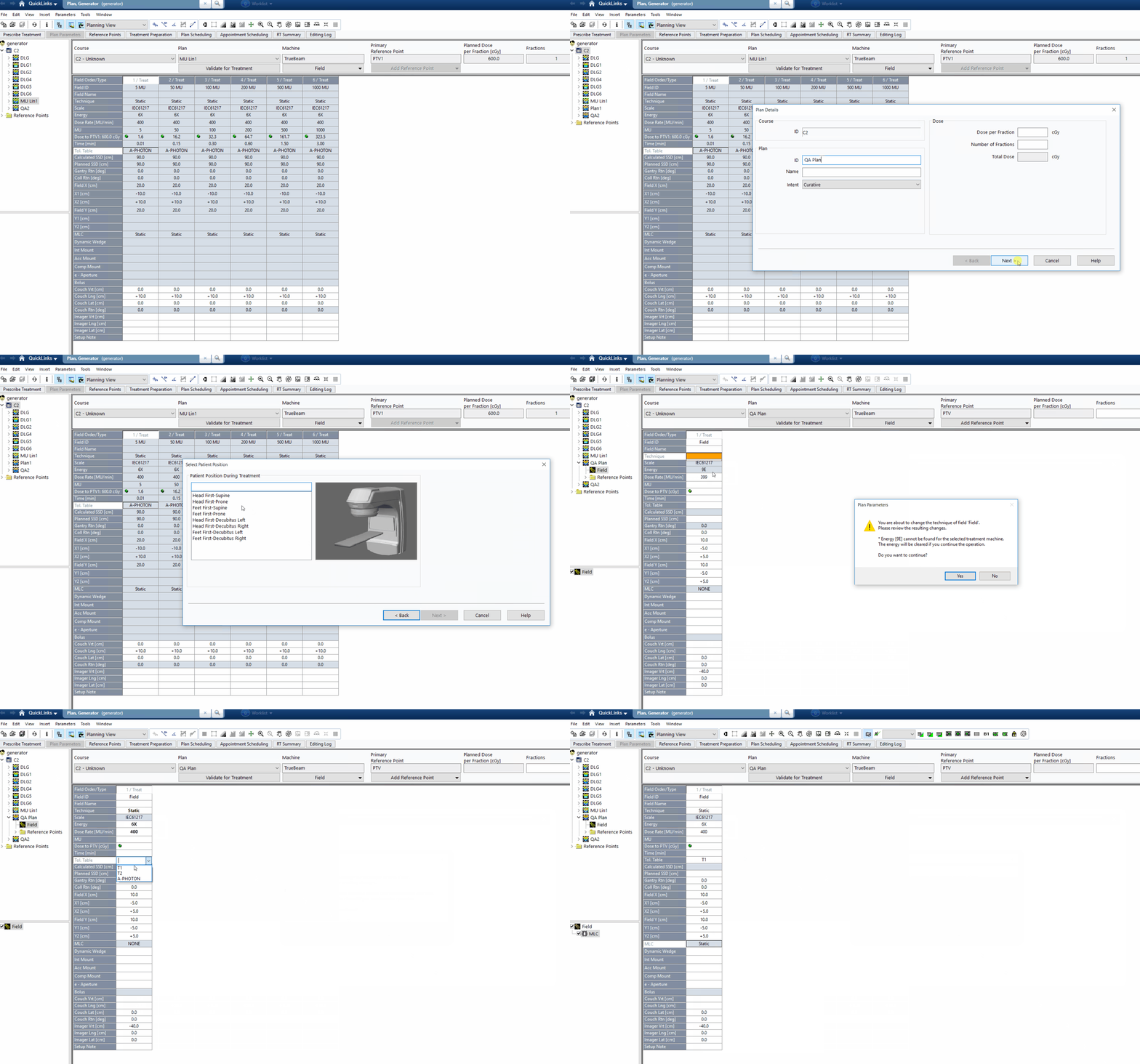
Use DICOM Import/Export to export the plan to a file.
Use case 2: Selecting a machine
Alternatively, you can create a Plan Generator by directly specifying the machine type. This approach is useful when you don’t have a base plan file available or when creating plans that don’t need to be associated with a specific machine in a clinical database. The machine type determines the MLC configuration and other machine-specific parameters.
from conjuror.plans.plan_generator import PlanGenerator
from conjuror.plans.truebeam import TrueBeamMachine
from conjuror.plans.halcyon import HalcyonMachine

# create generator for a TrueBeam machine
machine = TrueBeamMachine(mlc_is_hd=False)
generator = PlanGenerator.from_machine(
    machine,
    machine_name="TrueBeam",
    plan_name="New QA Plan",
    plan_label="New QA",
    patient_name="QA Patient",
    patient_id="QA001"
)

# or create generator for a Halcyon machine
halcyon_machine = HalcyonMachine()
generator = PlanGenerator.from_machine(
    halcyon_machine,
    machine_name="Halcyon",
    plan_name="New QA Plan",
    plan_label="New QA",
    patient_name="QA Patient",
    patient_id="QA001"
)
Adding procedures
Once the plan generator has been created, QA procedures can be added to the plan. The generator is responsible for adding machine information to each beam and updating the RT Fraction Scheme Module.
procedure = OpenField(x1=-5, x2=5, y1=-10, y2=110, defined_by_mlc=True, padding=10)
generator.add_procedure(procedure)
Pre-defined procedures
The plan generator comes with pre-defined procedures for typical QA tests (Picket-Fence, Open field, etc). For a comprehensive list of available procedures use the list_procedure method:
generator.list_procedures()
Advanced features
Customize machine parameters
The Plan Generator accounts for specific machine parameters — such as maximum gantry speed and maximum MLC speed — that define the physical limits of the target treatment machine. These parameters are immutable properties of the machine and are used when creating certain procedures, such as MLC speed tests.
By default, most machines use a set of standard parameter values. However, when necessary, it is possible to define custom machine specifications to reflect site-specific configurations or non-standard equipment. There are two supported methods for creating custom machine specifications:
Take default machine specs and replace one or more parameters.
from conjuror.plans.plan_generator import PlanGenerator
from conjuror.plans.truebeam import DEFAULT_SPECS_TB
specs = DEFAULT_SPECS_TB.replace(max_gantry_speed=4.8, max_mlc_speed=20)
generator = PlanGenerator(..., machine_specs=specs)
Create new machine specs via
MachineSpecs
from conjuror.plans.plan_generator import PlanGenerator, MachineSpecs
specs = MachineSpecs(
   max_gantry_speed=4.8,
   max_mlc_position=200,
   max_mlc_overtravel=100,
   max_mlc_speed = 20)
generator = PlanGenerator(..., machine_specs=specs)
Create custom procedures
Custom procedures can be created by extending the QAProcedure abstract
class in the appropriate machine module. When computing a custom procedure, a
target machine must be specified — for example, when implementing a procedure
to create a circle, the MLC leaf side boundaries need to be known. To simplify
procedure creation without relying on a base plan, you can instantiate a
Machine class and then pass it to the compute method as an argument.
from pydantic import Field
from conjuror.plans.truebeam import QAProcedure, TrueBeamMachine

class CircleProcedure(QAProcedure):
    """Create a circular MLC aperture."""

    radius: float = Field(
        title="Radius",
        description="The radius of the circle.",
        json_schema_extra={"units": "mm"},
    )

    def compute(self, machine):
        # business logic
        pass

    def plot(self):
        # business logic
        pass

def test_circle():
    machine = TrueBeamMachine(mlc_is_hd=False)
    circle = CircleProcedure(radius=5.0)
    circle.compute(machine)  # This step is also done automatically in add_procedure
    circle.plot()
API
Core classes
- class conjuror.plans.plan_generator.PlanGenerator(base_plan: Dataset, plan_label: str, plan_name: str, patient_name: str | None = None, patient_id: str | None = None, machine_specs: MachineSpecs = None)[source]
A tool for generating new QA RTPlan files based on an initial base RTPlan file.
Parameters
- base_planDataset
The RTPLAN dataset to base the new plan off of. The plan must already have MLC positions.
- plan_labelstr
The label of the new plan.
- plan_namestr
The name of the new plan.
- patient_namestr, optional
The name of the patient. If not provided, it will be taken from the RTPLAN file.
- patient_idstr, optional
The ID of the patient. If not provided, it will be taken from the RTPLAN file.
- machine_specsMachineSpecs
The specs of the machine
- class conjuror.plans.machine.MachineSpecs(max_gantry_speed: float, max_mlc_position: float, max_mlc_overtravel: float, max_mlc_speed: float)[source]
This class is a dataclass holding machine specs
Parameters
- max_gantry_speedfloat
The maximum gantry speed in deg/sec
- max_mlc_positionfloat
The max mlc position in mm
- max_mlc_overtravelfloat
The maximum distance in mm the MLC leaves can overtravel from each other as well as the jaw size (for tail exposure protection).
- max_mlc_speedfloat
The maximum speed of the MLC leaves in mm/s.
Base classes
- class conjuror.plans.machine.MachineBase[source]
This is a base class that represents a generic machine (TrueBeam or Halcyon)
- pydantic model conjuror.plans.plan_generator.QAProcedureBase[source]
Bases:
BaseModel,Generic[TMachine],ABCAn abstract base class for generic QA procedures.
Create a new model by parsing and validating input data from keyword arguments.
Raises [ValidationError][pydantic_core.ValidationError] if the input data cannot be validated to form a valid model.
self is explicitly positional-only to allow self as a field name.
- class conjuror.plans.beam.Beam(beam_limiting_device_sequence: Sequence, beam_name: str, energy: float, fluence_mode: FluenceMode, dose_rate: int, metersets: Sequence[float], gantry_angles: float | Sequence[float], coll_angle: float, beam_limiting_device_positions: dict[str, list], couch_vrt: float, couch_lat: float, couch_lng: float, couch_rot: float)[source]
Represents a DICOM beam dataset. Has methods for creating the dataset and adding control points.
Parameters
- beam_limiting_device_sequenceDicomSequence
The beam_limiting_device_sequence as defined in the template plan.
- beam_namestr
The name of the beam. Must be less than 16 characters.
- energyfloat
The energy of the beam.
- fluence_modeFluenceMode
The fluence mode of the beam.
- dose_rateint
The dose rate of the beam.
- metersetsSequence[float]
The meter sets for each control point.
- gantry_anglesUnion[float, Sequence[float]]
The gantry angle(s) of the beam. If a single number, it’s assumed to be a static beam. If multiple numbers, it’s assumed to be a dynamic beam.
- coll_anglefloat
The collimator angle.
- beam_limiting_device_positionsdict[str, list]
The positions of the beam_limiting_device_positions for each control point, where key is the type of beam limiting device (e.g. “MLCX”) and the value contains the positions.
- couch_vrtfloat
The couch vertical position.
- couch_latfloat
The couch lateral position.
- couch_lngfloat
The couch longitudinal position.
- couch_rotfloat
The couch rotation.
Derived classes - TrueBeam
- class conjuror.plans.truebeam.TrueBeamMachine(mlc_is_hd: bool, specs: MachineSpecs | None = None)[source]
A class that represents a TrueBeam machine.
- class conjuror.plans.truebeam.QAProcedure(*, beams: ~typing.Annotated[list[~conjuror.plans.beam.Beam[~conjuror.plans.truebeam.TrueBeamMachine]], ~pydantic.json_schema.SkipJsonSchema()] = <factory>)[source]
Create a new model by parsing and validating input data from keyword arguments.
Raises [ValidationError][pydantic_core.ValidationError] if the input data cannot be validated to form a valid model.
self is explicitly positional-only to allow self as a field name.
- class conjuror.plans.truebeam.Beam(mlc_is_hd: bool, beam_name: str, energy: float, fluence_mode: FluenceMode, dose_rate: int, metersets: Sequence[float], gantry_angles: float | Sequence[float], x1: float, x2: float, y1: float, y2: float, mlc_positions: list[list[float]], coll_angle: float, couch_vrt: float, couch_lat: float, couch_lng: float, couch_rot: float)[source]
A class that represents a TrueBeam beam.
Parameters
- mlc_is_hdbool
Whether the MLC type is HD or Millennium
- beam_namestr
The name of the beam. Must be less than 16 characters.
- energyfloat
The energy of the beam.
- fluence_modeFluenceMode
The fluence mode of the beam.
- dose_rateint
The dose rate of the beam.
- metersetsSequence[float]
The meter sets for each control point. The length must match the number of control points in mlc_positions.
- gantry_anglesUnion[float, Sequence[float]]
The gantry angle(s) of the beam. If a single number, it’s assumed to be a static beam. If multiple numbers, it’s assumed to be a dynamic beam.
- x1float
The left jaw position.
- x2float
The right jaw position.
- y1float
The bottom jaw position.
- y2float
The top jaw position.
- mlc_positionslist[list[float]]
The MLC positions for each control point. This is the x-position of each leaf for each control point.
- coll_anglefloat
The collimator angle.
- couch_vrtfloat
The couch vertical position.
- couch_latfloat
The couch lateral position.
- couch_lngfloat
The couch longitudinal position.
- couch_rotfloat
The couch rotation.
Derived classes - Halcyon
- class conjuror.plans.halcyon.HalcyonMachine(machine_specs: MachineSpecs | None = None)[source]
A class that represents a TrueBeam machine.
- class conjuror.plans.halcyon.QAProcedure(*, beams: ~typing.Annotated[list[~conjuror.plans.beam.Beam[~conjuror.plans.halcyon.HalcyonMachine]], ~pydantic.json_schema.SkipJsonSchema()] = <factory>)[source]
Create a new model by parsing and validating input data from keyword arguments.
Raises [ValidationError][pydantic_core.ValidationError] if the input data cannot be validated to form a valid model.
self is explicitly positional-only to allow self as a field name.
- class conjuror.plans.halcyon.Beam(beam_name: str, metersets: Sequence[float], gantry_angles: float | Sequence[float], distal_mlc_positions: list[list[float]], proximal_mlc_positions: list[list[float]], coll_angle: float, couch_vrt: float, couch_lat: float, couch_lng: float)[source]
A class that represents a Halcyon beam.
Parameters
- beam_namestr
The name of the beam. Must be less than 16 characters.
- metersetsSequence[float]
The meter sets for each control point. The length must match the number of control points in mlc_positions.
- gantry_anglesUnion[float, Sequence[float]]
The gantry angle(s) of the beam. If a single number, it’s assumed to be a static beam. If multiple numbers, it’s assumed to be a dynamic beam.
- distal_mlc_positionslist[list[float]]
The distal MLC positions for each control point. This is the x-position of each leaf for each control point.
- proximal_mlc_positionslist[list[float]]
The proximal MLC positions for each control point. This is the x-position of each leaf for each control point.
- coll_anglefloat
The collimator angle.
- couch_vrtfloat
The couch vertical position.
- couch_latfloat
The couch lateral position.
- couch_lngfloat
The couch longitudinal position.